
Platform capability
The right alert, to the right person, at the right time.
Halo’s alerting is per-resident, per-severity, and per-shift. The same event routes differently at 3am than at 11am. Immediate alerts escalate automatically if unacknowledged. Informational alerts sit in the summary. Nothing wakes the on-call at 3am for a low-battery notification.
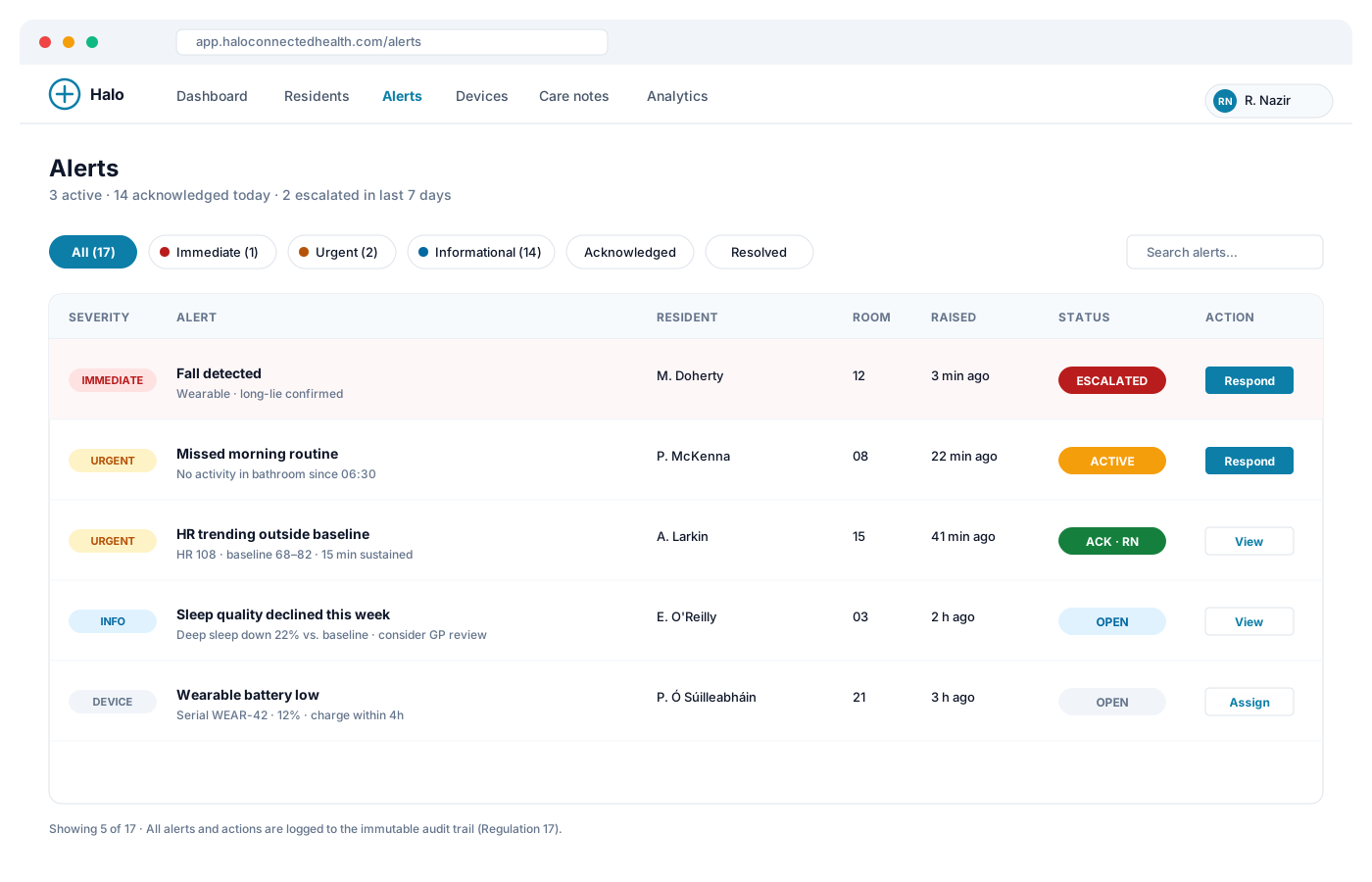
Alert profile per resident
Every resident has their own alert profile. Attributes:
- Baseline — the adaptive baseline the platform has learned over the first 2–3 weeks (or an initial configured range)
- Thresholds — deviations that trigger an alert, expressed as absolute values or standard deviations from baseline
- Severity — immediate (fall detected), urgent (missed morning routine), informational (weekly sleep decline)
- Escalation chain — ordered list of contacts: primary carer → shift lead → on-call manager → clinical escalation
- Quiet hours — different alert routing during declared quiet hours or sleep periods
- Consent flags — which alerts the resident has consented to share with which contacts
Profiles are editable by any user with the appropriate role; every change is audited.
Severity tiers explained
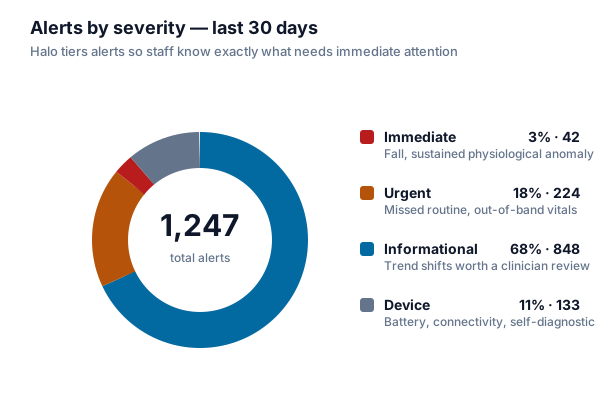
Immediate — genuine emergency. Fall detected, seizure detected, vital signs outside safety envelope. Push notification, SMS, and voice call to primary contact. Auto-escalation on inaction.
Urgent — needs attention within the shift. Missed morning routine, prolonged inactivity, blood pressure trending outside baseline, door left open with no return. Push notification and dashboard flag.
Informational — worth noting, no action required now. Trending sleep quality decline, medication routine variance, appetite changes visible in kitchen sensor data. Summary digest, weekly report.
Device / operational — battery low, sensor offline, calibration needed. Routed to maintenance role, not clinical.
You define which categories map to which severity per resident. Halo ships with sensible defaults you can adjust.
Escalation on inaction
Immediate alerts require acknowledgement. If not acknowledged within the configured window:
- Acknowledgement window — typically 60 seconds — for primary contact
- First escalation — the next contact in the chain, typically shift lead
- Second escalation — on-call manager or clinical escalation
- Terminal escalation — external emergency services routing, if configured and consented
Every step is logged. Every step timestamps who was notified, whether they acknowledged, and how the alert was ultimately resolved.
Escalation stops the moment an alert is acknowledged. Acknowledgement is a real action — a single tap in the mobile app or dashboard — not just “opening the notification.”
Time-aware and shift-aware routing
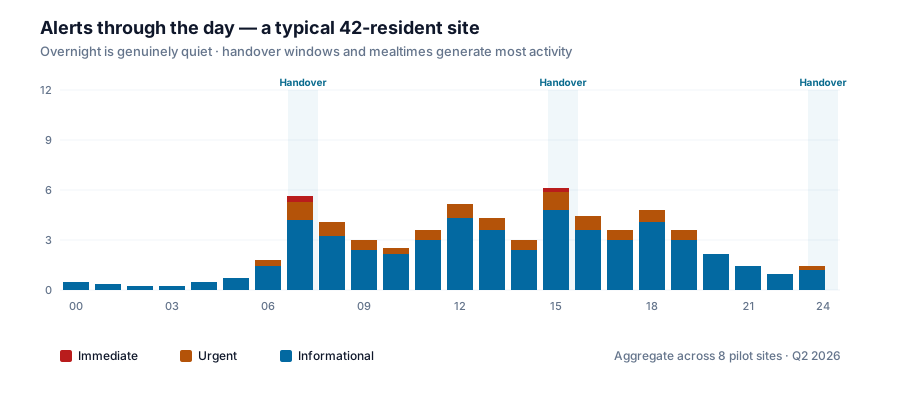
The same event routes differently based on time and shift:
- Business hours — alerts route to the resident’s key worker or care coordinator
- Overnight — alerts route to the night shift lead, with escalation to on-call manager
- Handover windows — routing shifts explicitly at rota-defined times (e.g. 07:00 shift change), no lost alerts
- Weekends and holidays — different on-call configuration if you use it
Rota is either configured in Halo or synced from your workforce management system (integration available on Enterprise tier).
Alert audit and learning
Every alert is auditable:
- Who was notified, when, and via which channel
- Who acknowledged, when, and from which device
- How the alert was resolved (real emergency, false positive, informational only)
- The full sensor context at the time the alert fired
Alerts flagged as false positives inform the model. Over time, per-resident thresholds tune down — reducing alarm fatigue further.
Details in Audit & compliance.
Related
- Device Monitoring — where alerts come from
- Care Notes — alert resolutions link into the care record
- Predictive Healthcare — roadmap for pre-alert prediction